
Product Label Printing: Why Good Artwork Is Not Enough
Updated: Jul 26
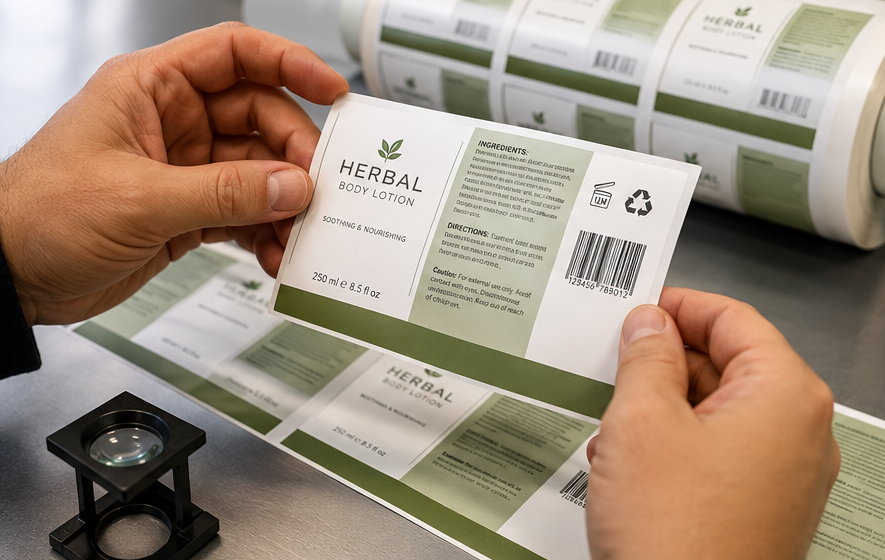
Product label printing is not just about getting a nice design onto a roll or sheet. A product label has to fit the container, carry important information, scan properly, survive handling, and support the brand when the product reaches the customer.
That is where many small brands run into trouble.
The artwork may look polished on screen, but the printed label can still fail in practical ways. Small text can become hard to read. A barcode can scan poorly. A label can lift in a fridge. A dieline can cut too close to the required information. A last-minute file change can send the wrong version into production.
For product brands, especially food, beverage, cosmetics, health, specialty goods, and packaged consumer products, labels are carrying more responsibility than ever. They are not just marketing pieces. They are part of the product system.
A good printer cannot ensure your regulatory compliance. That responsibility stays with the brand owner and the right compliance advisor. But a practical print partner can help catch production issues affecting readability, fit, durability, barcode performance, and version control before labels are printed.
Why Product Label Printing Needs More Production Awareness
A product label usually has several jobs at once:
Identify the product
Support the brand
Display required product information
Hold a barcode or QR code
Separate flavours, sizes, versions, or SKUs
Stay readable after handling
Apply cleanly to the package
Hold up in storage, shipping, retail, or customer use
That is a lot of work for a small piece of print.
A postcard or flyer can sometimes tolerate small imperfections. A product label usually cannot. If a flyer has a slightly soft image, the campaign may still run. If a barcode does not scan, a label lifts off the package, or important copy is trimmed too close, the product may need to be delayed, relabelled, or reprinted.
This is why label printing should be treated as a production decision, not only a design purchase.
Compliance-Aware Printing Does Not Mean Compliance Approval
This distinction matters.
A printer can help with practical production checks. That includes file setup, size, bleed, safe margins, barcode placement, material selection, adhesive suitability, colour contrast, proofing, and version control.
A printer should not tell you that your food, cosmetic, health product, chemical, or consumer product label is legally compliant unless they are qualified to do that specific work.
For most brands, the smarter approach is:
The brand confirms what information must appear on the label.
The designer lays out the approved content.
The printer checks whether the label can be produced clearly, accurately, and reliably.
A proof or test run confirms fit, scanning, and handling before full production.
That keeps each role clear and reduces the risk of expensive assumptions.
The Most Common Label Printing Problems
1. Small text that looks fine on screen but fails in print
Design files are often reviewed at 150% or 200% zoom. The label is approved because everything looks readable on a monitor.
Then the label prints at the final size.
Small ingredients, instructions, warnings, usage details, or bilingual copy may be difficult to read, especially if the type is thin, reversed-out, low-contrast, or printed on textured, clear, metallic, or coated material.
Better approach: review the label at actual size and request a printed proof if small text matters. Screen approval is not enough for detailed product labels.
2. Critical content too close to the edge
Labels need bleed and safe margins.
Bleed allows the background colour or image to extend past the trim, so there are no unwanted white edges after cutting. Safe margin keeps important content away from the cut line.
This matters because trimming and die-cutting have normal production tolerances. If important copy, icons, certification marks, nutrition details, barcode numbers, or QR codes sit too close to the edge, a small shift can make the finished label look off or affect readability.
Better approach: keep all critical information comfortably inside the safe area. Do not treat the dieline as the safe limit.
3. Barcode or QR code problems
Barcodes and QR codes are often dropped into a design as if they are just another graphic. They are not.
They need the right size, contrast, quiet zone, placement, and printed clarity. A barcode placed too close to a curve, seam, fold, edge, or glossy reflection can become unreliable. A QR code printed too small or over a busy background can also create scanning problems.
Better approach: test the barcode or QR code from a printed proof, not only from a PDF on screen.
4. Wrong material for the product environment
Label material should be chosen based on where the product goes and how it is handled.
A standard paper label may work well for dry goods, boxes, jars, bags, and short-term indoor use. It may not be the right choice for refrigeration, freezer storage, condensation, oils, cosmetics, moisture, abrasion, or outdoor exposure.
Film, synthetic, clear, freezer-grade, removable, or stronger adhesive labels may be better depending on the product.
Better approach: choose the label stock and adhesive based on the container, surface, storage condition, and handling environment.
5. Labels that fit the file but not the container
A flat label proof does not always show how the label behaves on the actual package.
Curved bottles, jars, tubes, pouches, small containers, textured surfaces, squeezable packaging, and tapered shapes can all create issues. A label may wrinkle, lift, skew, or hide important information once applied.
Better approach: test the label on the real container before ordering the full run.
6. Version control mistakes
Product labels often come in families:
Different flavours
Different scents
Different colours
Different sizes
Different SKUs
Different barcodes
Different languages
Seasonal or limited-run versions
Ingredient or formula changes
When files are loosely named or revised multiple times, it becomes easy to print an outdated version or mix up SKUs.
Better approach: send one final approved PDF per version, with clear file names and a version list that matches the order quantity.
For new products, multiple SKUs, or revised packaging, CETTEC’s product label printing service includes artwork and production review before the job goes to print.
What to Check Before Printing Product Labels
Label size and shape
Confirm the exact finished size before finalizing the design. A small change in size can affect text readability, barcode spacing, roll layout, material yield, and cost.
For shaped labels, the dieline should be supplied as a separate spot colour or clearly marked as a non-printing guide. The dieline should not accidentally print as part of the artwork.
Bleed and safe margins
Most labels need bleed beyond the final cut. Important text, barcode elements, icons, and symbols should stay inside the safe margin.
This is especially important for small labels because there is less room to absorb production tolerance.
Resolution and image quality
Images should be high resolution at final print size. Low-resolution images may look acceptable on screen but print soft or pixelated.
This matters for product photography, small icons, detailed illustrations, and fine brand elements.
Colour and contrast
Colour should be reviewed with print in mind. Soft grey type, low-contrast text, reversed white type, metallic effects, transparency effects, and rich blacks can behave differently in print than they do on screen.
For small text, readability is usually more important than subtle design effects.
Barcode quiet zone
A barcode needs clear space around it. That space is called the quiet zone. If artwork, borders, text, or trim lines crowd the barcode, scanning can suffer.
Do not place a barcode too close to the label edge just to save space.
Material and adhesive
Paper, film, clear, matte, gloss, synthetic, freezer-grade, removable, and permanent labels all behave differently.
The adhesive should match the application surface and product environment. Glass, plastic, cardboard, pouches, metal, textured containers, cold surfaces, and oily surfaces can all affect performance.
Roll direction or sheet format
If labels are applied by machine, roll direction is critical. The label must come off the roll in the correct orientation for the applicator.
Even for hand application, roll direction can affect workflow, speed, and consistency.
Proof approval
A PDF proof checks the layout and content. A physical proof checks size, readability, colour, barcode scanning, and real-world appearance.
For a new product label, a physical proof or a small-batch test can save on a larger reprint later.
Best Label Choices by Product Situation
Product situation | Better label direction | Why it helps |
Dry goods, jars, boxes, bags | Paper label with suitable coating | Cost-effective and clean for standard handling |
Refrigerated product | Moisture-resistant film or a suitable coated label | Helps with condensation and handling |
Freezer product | Freezer-grade adhesive | Reduces the risk of lifting in cold storage |
Cosmetic or oil-based product | Synthetic label with stronger adhesive | Better durability around moisture, oils, and frequent handling |
Small product launch | Short digital label run | Let's the brand test fit, copy, barcode, and finish |
Multiple SKUs | Clearly separated version files | Reduces the risk of printing the wrong artwork |
Retail product | Barcode-tested proof | Helps avoid scanning problems before launch |
When a Simple Label Is the Better Choice
Not every product needs a premium label finish.
For test batches, short runs, local launches, seasonal items, and early product validation, a clean and practical label may be smarter than overbuilding the spec.
A simple label can work well when:
The product is still being tested
The formula or ingredients may change
The brand is validating demand
The product is used indoors
The container is simple
The label does not face moisture or heavy handling
The order quantity is small
A premium finish may make sense when:
The product is retail-facing
Shelf appearance matters
The container is often handled
The product is exposed to moisture
The brand needs a more polished look
The label must support a higher price point
The same design will be used for a larger production run
The right choice is not always the most expensive option. The right choice is the one that matches
the product, customer, environment, and budget.
When to Request a Proof or Small Test Run
A proof is especially useful when:
The label includes small text
The barcode or QR code must scan reliably
The label wraps around a curved container
The product will be refrigerated or frozen
The label may face moisture, oils, or abrasion
The design uses clear, metallic, textured, or synthetic material
There are several versions or SKUs
The label is going on a new container
The product launch timing is tight
The order quantity is large enough that a mistake would be costly
For new products, a small test run is often a smart first step. Apply the label to the real container. Put it through normal handling. Check for lifting, wrinkling, curling, scuffing, readability, and barcode scanning.
It is better to find a label problem on 25 samples than after printing thousands.
File Setup Checklist for Product Labels
Before sending artwork for product label printing, check:
Final label size is confirmed
Dieline is included and clearly marked
Bleed extends past the trim line
Important content stays inside the safe margin
Images are high resolution at the final size
Fonts are outlined or properly embedded
Colour is set up for print
Small text has enough contrast
Barcode has the proper size and quiet zone
QR code scans from printed output
White ink or clear label effects are clearly specified, if needed
Roll direction is confirmed, if roll labels are required
Material and adhesive requirements are known
Each SKU or version has its own final PDF
File names clearly identify the version
Quantity is broken down by version
Questions to Answer Before Requesting a Label Quote
For a faster and more accurate quote, send:
Finished label size
Label shape
Quantity
Number of versions or SKUs
Roll labels or sheet labels
Hand application or machine application
Required roll direction, if known
Product container type
Application surface
Indoor, outdoor, fridge, freezer, or moisture exposure
Paper, film, clear, matte, gloss, or synthetic preference
Permanent, removable, freezer-grade, or specialty adhesive needs
Barcode or QR code requirements
Deadline
Print-ready artwork, if available
If you are not sure about the material or adhesive, describe the product and how the label will be used. That gives the printer enough information to suggest a better starting point.
Common Mistakes to Avoid
Approving only from the screen
Screens hide size, texture, reflection, adhesive, and handling issues. Always review important labels at the final printed size.
Choosing material based only on price
A cheaper label can become expensive if it fails during storage, shipping, application, or customer use.
Leaving barcode testing until after production
Barcode and QR code testing should happen before the full order is printed.
Mixing old and new artwork files
Version control is one of the easiest ways to lose money on labels. Final files should be clearly named and approved.
Ignoring the actual container
The label must work on the real package, not just in the design file.
FAQs
Can CETTEC confirm whether my label is legally compliant?
CETTEC can help review practical print production details, including readability, bleed, safe margins, barcode placement, material selection, adhesive suitability, proofing, and version control. Legal or regulatory compliance should be confirmed by the brand owner or a qualified advisor.
Should I print a small test run before ordering all my labels?
For a new product, a new container, a new material, or an important retail launch, yes. A small test run helps confirm fit, readability, barcode scanning, adhesive performance, and overall presentation before the full quantity is produced.
What is the best material for product labels?
It depends on the product. Paper labels are good for many dry, indoor uses. Film or synthetic labels are often better for moisture, refrigeration, oils, cosmetics, freezer conditions, or heavier handling.
Why does roll direction matter?
Roll direction determines how labels come off the roll. It is especially important for machine-applied labels, but it can also make hand application faster and more consistent.
What is the biggest label printing mistake small brands make?
Approving artwork before testing it at the final size on the actual container. A printed proof catches problems that a screen preview often misses.
Wrap-Up
Product label printing needs more than attractive artwork. The label has to print clearly, fit the container, scan properly, hold up in the product environment, and keep every version organized.
For small brands, the safest approach is to confirm the content first, then check the production details: size, bleed, safe margins, barcode placement, material, adhesive, roll direction, proofing, and version control.
If the label is for a new product, a retail launch, a refrigerated item, a freezer product, a cosmetic item, or a multi-SKU order, request proof or a small test run before committing to the full quantity.
Send the size, quantity, artwork, product surface, application method, material preference, number of versions, and deadline for a more accurate label printing quote.


