Legal Print Order Checklist: What to Confirm Before Uploading Court Materials
When a legal print order is sent close to a filing, hearing, or service deadline, the PDF is only one part of the job.
Production also needs to know what the finished materials should look like: how many sets, which files are final, whether the document prints single-sided or double-sided, whether tabs are required, how the volumes break, and where the completed sets are going.
These are small details, but they are the details that create follow-up when the deadline is already close. A complete legal print order helps connect the files, instructions, and required turnaround time before production starts.
For Vancouver and BC legal professionals, a clean legal print order submission can reduce the need for clarification emails, prevent version confusion, and keep court materials moving with less rework.
What a Complete Legal Print Order Should Include
A legal print order form is not just an administrative step. It provides production with the information needed to properly prepare the job before the files are printed.
A good order submission confirms the practical details:
Contact name and phone number
Firm name and matter reference
Document type, such as Appeal Book, Appeal Record, Book of Authorities, factum, application record, affidavit, exhibit book, or litigation binder
Required completion date and time
Number of sets required
Single-sided or double-sided printing
Binding method, such as Cerlox, coil, binder, staple, or loose-leaf
Tabs, divider labels, or volume labels
Colour pages, photographs, or special reproduction concerns
Pickup, delivery, courier, or filing agent instructions
Secure upload details for large or confidential files
Those details affect scheduling, file review, printing, finishing, and delivery. A 40-page affidavit with one staple is not the same production path as six double-sided court books with blue covers, tabbed dividers, Cerlox binding, and sequential volume numbering.
The earlier those details are confirmed, the easier it is to stage the order cleanly.
Uploading the Files Is Not the Same as Giving Print Instructions
Secure upload is helpful for large legal PDFs and confidential court materials, but the upload itself does not always explain the job.
A folder may include files named:
Appeal_Record_Final.pdf
Appeal_Book_Volume_1.pdf
Factum_revised_FINAL.pdf
That tells production what files arrived. It does not confirm which files should be printed, whether an earlier upload should be ignored, how many sets are required, whether tabs are supplied separately, or whether the factum replaces a previous version.
A simple instruction note can prevent unnecessary follow-up:
Example instruction: Please print the files marked FINAL only. Appeal Record: 6 sets, double-sided, blue cover, Cerlox bound. Appeal Book Volume 1: 6 sets, double-sided, blue cover, Cerlox bound. Factum: 6 sets, buff cover, Cerlox bound. Please ignore the file uploaded yesterday. Pickup by filing agent before 2:00 PM.
That kind of note gives production the same picture the legal assistant has in mind.
What the Order Form Helps Production Confirm
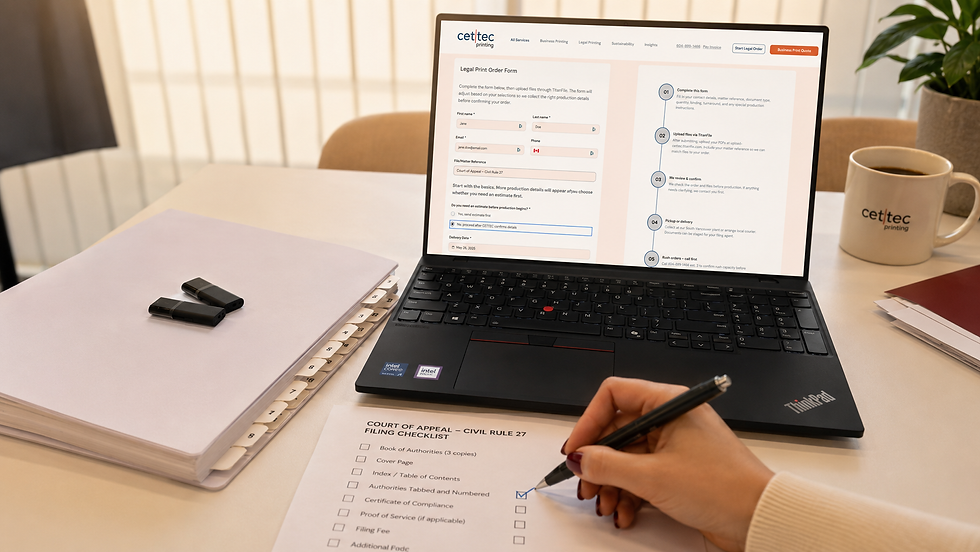
CETTEC’s legal print order form is meant to collect the details that are easy to miss in an email thread.
Before production begins, the form helps confirm the connection between the uploaded files and the finished court materials. That includes the document type, turnaround requirement, copy count, binding, tab setup, delivery method, and whether the order is standard, rush, or urgent.
This matters because legal document printing often involves more than pressing print. Court books, appeal materials, factums, books of authorities, and litigation binders may require cover colours, volume labels, page-order checks, tab placement, hole-punching, Cerlox binding, coil binding, binder assembly, or courier coordination.
When those instructions arrive with the files, production can review the order as one complete package instead of stopping to ask basic setup questions.
For same-day or urgent legal printing, phone confirmation is still important. Rush timing depends on file readiness, page count, copy count, finishing requirements, and current production capacity.
What to Check Before Submitting Court Materials
Before uploading court materials, take a few minutes to confirm the production details that most often cause delays.
File readiness
Check that the PDF is the version approved for print. Confirm that replacement pages have been inserted, old pages have been removed, and the file name clearly identifies the final version.
Production can check for obvious setup concerns, but the submitting office should confirm that the content, page order, pagination, and final version are approved before printing.
Avoid sending multiple files called “final” unless the instruction note explains which one should be used.
For combined PDFs, confirm that the page order matches the table of contents. If the document uses page labels, Bates numbering, or sequential numbering, check that the printed page numbers and PDF navigation make sense together.
Pagination and volume breaks
For Appeal Records, Appeal Books, Books of Authorities, application materials, and large exhibit books, volume breaks should be planned before printing begins.
Confirm whether each volume needs:
Its own cover page
A full table of contents
Volume numbering, such as “Volume 1 of 3”
Sequential page numbering from volume to volume
Tabs or dividers carried through each set
Changing a volume break after multiple sets have been printed and bound can require reprinting the covers, tables of contents, tabs, and affected sections.
Tabs and divider labels
Tabs should match the index or table of contents exactly.
If the table of contents says “Tab 4 – Affidavit of Jane Smith made May 12, 2026,” the tab instruction should not simply say “Tab 4 – Affidavit.”
For larger records, send a separate tab list if needed. Confirm whether tabs are numbered, lettered, custom-named, grouped by part, or separated by volume.
Copy count and destination
State the total number of sets required.
“Six sets total” is clearer than “copies for court and service” unless the printer has been given the exact breakdown.
Also, confirm where the completed materials are going. Pickup by your office, pickup by a filing
agent, local courier, and delivery to another law firm all require different handling notes.
Legal Print Order Checklist
Before submitting a legal print order, confirm:
The correct final PDF files are uploaded
Old or superseded versions are clearly excluded
The matter reference is included
The total number of sets is stated
Single-sided or double-sided printing is confirmed
The binding method is specified
Cover colour and cover wording are confirmed where required
Tabs, tab labels, and divider order are supplied
Volume breaks are identified
Pagination and table of contents have been checked
Bookmarks or page labels are reviewed if needed
Replacement pages are already inserted
Colour pages, photographs, or low-resolution scans are identified
Pickup, courier, delivery, or filing agent handoff is clear
Rush or urgent timing has been confirmed before relying on same-day completion
Common Mistakes That Create Follow-Up
The most common delay is an upload with no matching instruction. The files arrive, but production still has to ask how many sets, what binding, what tabs, or whether the file is final.
The second common issue is unclear version control. File names such as “final,” “final revised,” and “use this one” can pose a risk unless the order note explicitly confirms which PDF should be printed.
The third issue is incomplete finishing information. Tabs, covers, hole punching, binder assembly, Cerlox binding, coil binding, loose-leaf sets, and volume labels all need to be confirmed before production begins.
The fourth issue is late correction pages. If replacement pages are sent after printing starts, the affected sets may need to be stopped, pulled apart, corrected, and rechecked.
Final Takeaway
A complete legal print order provides production with the file, format, deadline, and delivery instructions at the same time.
That small amount of structure helps reduce follow-up, protects the schedule, and gives the finished court materials a cleaner path from upload to pickup, courier, or filing agent handoff.
When the order is urgent, submit the form and call to confirm timing before relying on same-day production. CETTEC’s legal print order form helps keep the upload, deadline, copy count, finishing instructions, and delivery notes together from the start.
Submitting an urgent legal print order?
Upload the final files, complete the legal print order form, and call CETTEC to confirm timing before relying on same-day production. Rush timing depends on file readiness, page count, copy count, finishing, tabs, binding, and current production capacity.